
Upload what you already have.
Find out if a threat affects you.
Send over the documents your team already keeps: vendor contracts, lists of the systems you run, network diagrams. Liberty91 turns them into an up-to-date picture of what each organisation in your account owns and depends on.
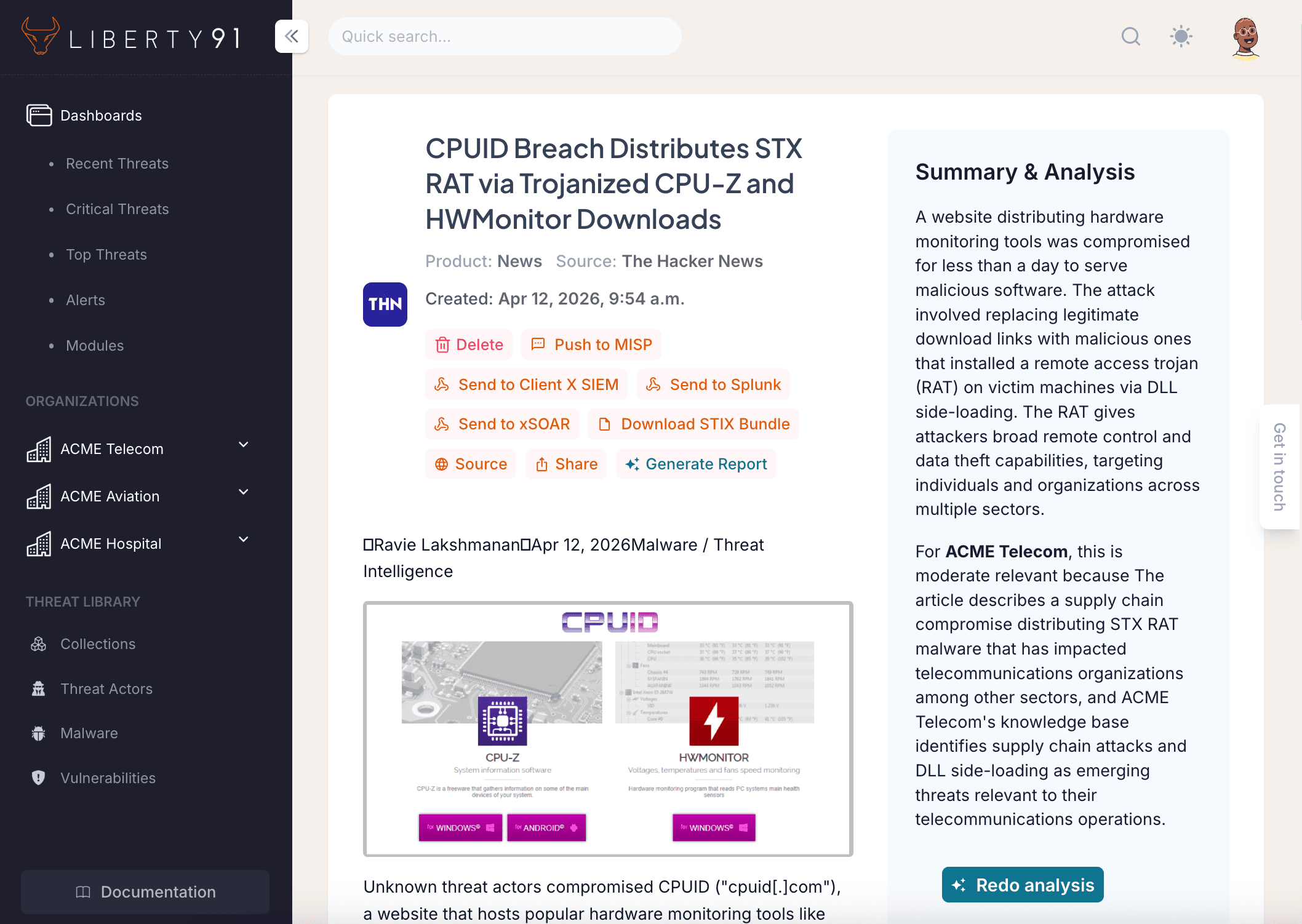
One click tells you which organisations are affected, and points to the documents it based that on.
The Problem.
Every time a new threat is reported, someone on your team has to work out whether it actually matters to your organisation. That usually means digging through vendor contracts, lists of systems, and architecture documents that live in five different places.
For MSSPs and security teams looking after several customers or business units, multiply that by every organisation you cover. The question is always the same: are we affected? Finding the answer should not take hours.
How It Works.
Upload Your Documents
Drop in PDFs, spreadsheets, slides, or plain text for any organisation or business unit: vendor contracts, lists of the systems you run, network diagrams, security policies, anything that describes what that organisation owns and who it depends on.
Confirm What Liberty91 Finds
Liberty91 reads each document into a private store and picks out the systems and the suppliers it mentions: your Okta, your ServiceNow, your Palo Alto firewalls, the vendors you rely on. Nothing is saved until you have looked at it and confirmed it.
Check Any Threat in One Click
Hit "Analyse now" on any threat event. Liberty91 checks it against every organisation in your account at the same time and writes a short summary, naming the specific documents and systems that make it relevant.
Answers You Can Check.
When you analyse a threat event, you get more than “you might be affected.” You get which organisations are affected, why, and a link back to the document you uploaded that says so.
Example output
ACME Aviation is affected: the article discusses OAuth consent attacks in Microsoft Entra ID, and ACME's uploaded SSO architecture shows Okta with known Entra overlap.
Bravo Logistics, no connection identified. None of the uploaded documents reference Microsoft identity services or OAuth infrastructure.
1 click
Check any threat event against every organisation in your account at the same time, so you know where to put your attention and where you can move on.
Private by Design.
Kept Separate Per Organisation
Every document goes into a private store belonging to that organisation. The stores are kept completely separate, so no data crosses between organisations or business units.
You Confirm Everything
The systems and suppliers Liberty91 finds are shown to you for confirmation before anything is saved. You decide what makes it into the profile.
Want to see this on your own organisation?
Request a demo, or start for free right away, and you will be looking at threat intelligence built around your own organisation rather than a generic one.