
Send Threat Intelligence to the People Who Need It.
Mailroom is where you send threat intelligence out: written reports, indicators of compromise (the IP addresses, domains, and file hashes tied to an attack), Sigma detection rules, and STIX bundles, straight to the people who act on them. Every send is recorded in a Sent log you can go back to, across every organisation in your account.
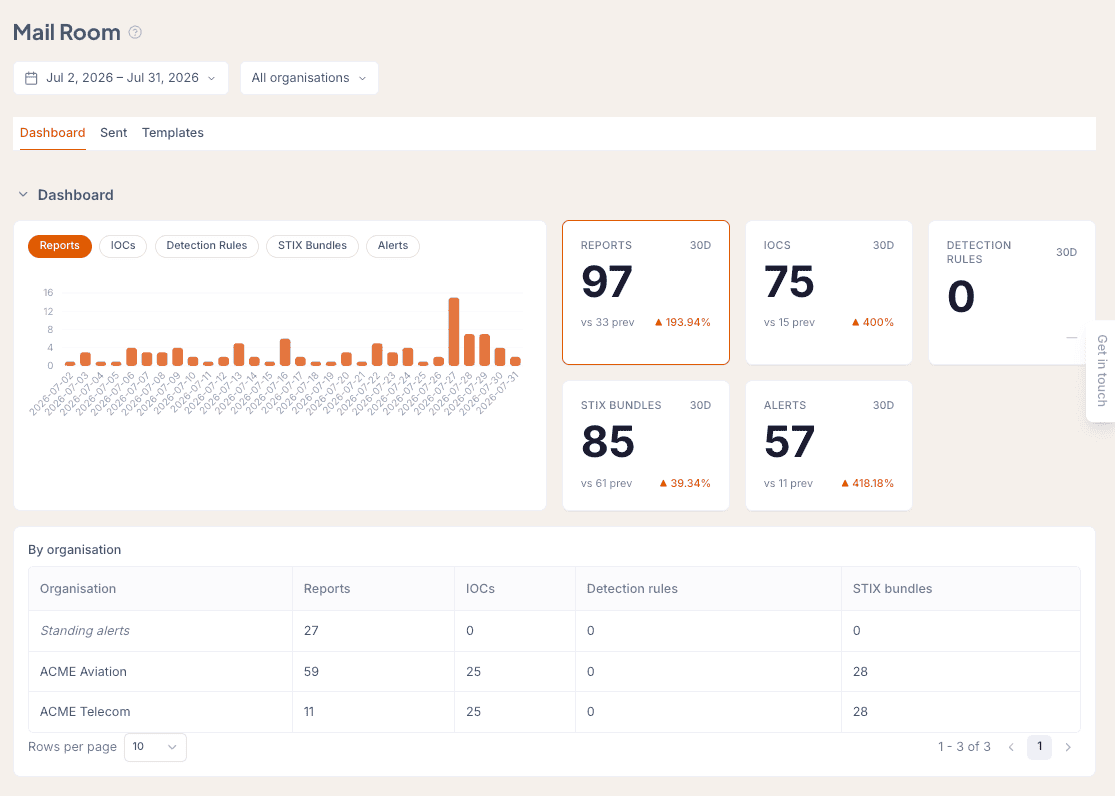
One dashboard for everything you have sent, filtered by organisation, with the full Sent log one tab away.
The Problem.
Threat intelligence only reduces risk if it reaches the person who can do something about it. That handover is usually a PDF forwarded by email, a Slack message with a list of indicators, or a file uploaded somewhere and left to chance. There is no record of what went out, in what format, to whom, or on what day.
For MSSPs and security teams covering several organisations, the problem multiplies. Each customer wants intelligence in the format their own tools can read, each CISO wants proof the work happened, and each analyst wants their report to land in the right inbox rather than a shared folder nobody opens.
Getting intelligence delivered is the last step of the job, and it is the step with the fewest tools built for it. That is what Mailroom is for.
How Sending Works.
Compose the Package
Put together what the recipient needs without leaving Liberty91: a written report, a list of indicators, Sigma detection rules, a STIX 2.1 bundle, or any mix of those. It all comes from the same intelligence the agents have already worked through, so there is no copying and pasting between tools.
Pick Who Receives It
Address it to the people who act on intelligence: the SOC, the CISO, the incident response team, a security lead, or contacts on the customer side. Mailroom keeps a separate recipient list for each organisation, so an MSSP can send each customer the right version without maintaining contact lists by hand.
Send and Keep the Record
Mailroom sends the package and writes a row in the Sent log: what went out, to whom, for which organisation, at what time, and what kind of send it was. That log is the evidence you bring to a quarterly review, a board update, or an audit.
What You Can Send.
There are four things you can put in a package and three ways to send it, so everyone gets intelligence in the format their own tools can read.
Reports
Written reports the platform has produced: assessments, briefings, answers to questions people have asked, and daily summaries, ready to send.
Indicators
Lists of indicators of compromise (IP addresses, domains, file hashes, URLs) pulled out of incoming reporting, ready to load into a SIEM, an endpoint tool, or a threat intelligence platform.
Detection rules
Sigma rules linked to the specific MITRE ATT&CK techniques they catch, ready for the SOC to put into its own detection tools.
STIX bundles
STIX 2.1 bundles that load straight into MISP, OpenCTI, or any sharing community that speaks TAXII.
Package
A one-off send. Pick a report, attach the indicators and the detection rules, and send it to the right person. This is the one most people use.
Morning Report
Your daily summary, sent through Mailroom so the morning brief is recorded in the same log as everything else.
Alert
An urgent send, triggered when a threat event crosses the threshold on one of your Intelligence Requirements (the standing questions you have asked the platform to keep answering). Same record in the log, faster route to the inbox that acts on it.
Multi-tenant by default.
Mailroom's organisation filter lets you look at one customer's send history on its own, or the whole customer base at once. Recipient lists are kept per customer organisation, so the SOC at ACME Aviation gets ACME Aviation's intelligence, and the Sent log gives you the evidence to bring to a quarterly review or a renewal conversation.
The Sent log.
Every send is recorded. The Sent log holds the time, the kind of send (Package, Morning Report, Alert), who received it, which organisation it was for, and the title of what went out. Filter by date range or organisation to pull out the part you need for a board update, an audit, or a handover to a colleague.
Example row
On May 14, 2026 Mailroom sent a Package titled BlackCat/ALPHV tactics against telecom operators to ciso@acmetelecom.example.com on behalf of the ACME Telecom organisation.
That row stays in the log. When the CISO asks at next quarter's review what you shared on telecom threats back in May, the answer is already on screen.
It fits the tools the people receiving it already use.
STIX 2.1 and MISP-ready
STIX bundles go out as standards-compliant 2.1 JSON, ready to load into MISP, OpenCTI, or any community that speaks TAXII. Nobody on the receiving end has to convert anything.
Sigma rules mapped to MITRE ATT&CK
Detection rules go out in Sigma format, each one labelled with the MITRE ATT&CK technique it is built to catch, so the receiving SOC can wire them straight into its own tools and see where the gaps are.
Indicator lists ready for the SIEM
Indicator lists are formatted to load straight into SIEMs, endpoint tools, and threat intelligence platforms, with the type of each indicator (IP address, domain, file hash, URL) and the context behind it attached.
Written reports for people to read
CISO briefings, answers to questions people have asked, and daily summaries go out as reports someone can simply sit down and read. That is what your board, your incident response team, and your customers want.
Where Mailroom fits in the work.
Threat intelligence work runs in stages: gathering the raw material, sorting it, analysing it, and then getting the result to whoever needs it. The first three stages are well served by tools and the last one rarely is. Liberty91's agents already cover the first three across hundreds of sources, your Intelligence Requirements (the standing questions you need answered) keep that analysis pointed at what matters to you, and Document Upload (where you add your contracts, inventories, and diagrams) builds each organisation's profile out of documents you already have.
Mailroom handles that last stage. Anything the platform produces can be sent on to the person who acts on it, and every send is recorded.
Frequently Asked Questions.
Want to see this on your own organisation?
Request a demo, or start for free right away, and you will be looking at threat intelligence built around your own organisation rather than a generic one.