
Wiring OpenCTI and MISP into an AI Agent Workflow with MCP.
You can connect both OpenCTI and MISP to an AI agent today over the Model Context Protocol, using servers published by the platform maintainers themselves. Filigran shipped an official MCP server for OpenCTI and is now moving that capability inside the platform, and the MISP project publishes an official read-only MCP server built on PyMISP. Once either is configured, an agent like Claude Code can query your threat intelligence platform mid-task: look up an indicator, pull the surrounding events, check which actor a technique belongs to, and fold the answers into its analysis without you copying anything by hand. This guide covers which server to pick for each platform, the exact configuration that works, and the gotchas we hit along the way.
Everything below assumes you have an instance to point at. If you do not have OpenCTI running yet, our guide to setting up OpenCTI with Docker gets you a working platform in about an hour, and the credentials you create in its Step 2 are the same ones you will use here.
What an MCP server is, and why it suits a threat intelligence platform
The Model Context Protocol is an open standard, introduced by Anthropic in late 2024 and since adopted across the major AI tools, that lets an application describe itself to a language model as a set of typed tools. An MCP server is the small program that does the describing: it sits in front of an existing API, exposes a handful of well-defined operations such as “search events” or “get indicator”, and handles authentication and formatting so the model does not have to. The agent sees a menu of things it can do; the server translates each request into real API calls against your platform.
For a threat intelligence platform this is a better fit than it first sounds, because TIP data is a graph, and graphs reward follow-up questions. A chatbot you paste an indicator into gets one shot at the context you gave it. An agent connected to your TIP over MCP can ask its own follow-ups: resolve the indicator, fetch the events it appears in, pull the actor those events are attributed to, then check which of your assets the actor's known techniques touch. That chain of queries is what agentic AI means in practice, and MCP is the plumbing that makes it possible against your own instance, with your own keys.
The lay of the land in mid-2026
A year ago, connecting an agent to OpenCTI or MISP meant picking a community project and hoping it kept pace. That has changed, and it changed very recently.
On the OpenCTI side, Filigran released an official MCP server, xtm-mcp, in March 2026 and bundled it with OpenCTI 6.8, where it powers Ariane, the platform's built-in natural-language assistant. In July 2026 they archived the standalone repository, with an embedded MCP server on the platform's public roadmap as its successor. That built-in server has not shipped at the time of writing, in either the community or the enterprise edition, so the practical options today are the archived-but-functional official server and the community alternatives. Worth knowing before you invest either way: the direction of travel is that MCP becomes something the platform does natively rather than a separate install.
On the MISP side, the project published misp-mcp under the official MISP GitHub organisation in April 2026, written by one of MISP's core maintainers. It is deliberately read-only, which makes it a comfortable first thing to point at an instance you care about, though it also means write workflows need a different route for now, and we come back to that below. The community-built MISP servers that predate it have been quiet since early 2025, and the one that does offer writes exposes them unscoped, up to and including user creation, which is far more reach than any analysis workflow needs. Provenance and maintenance both point the same way: build on the official one.
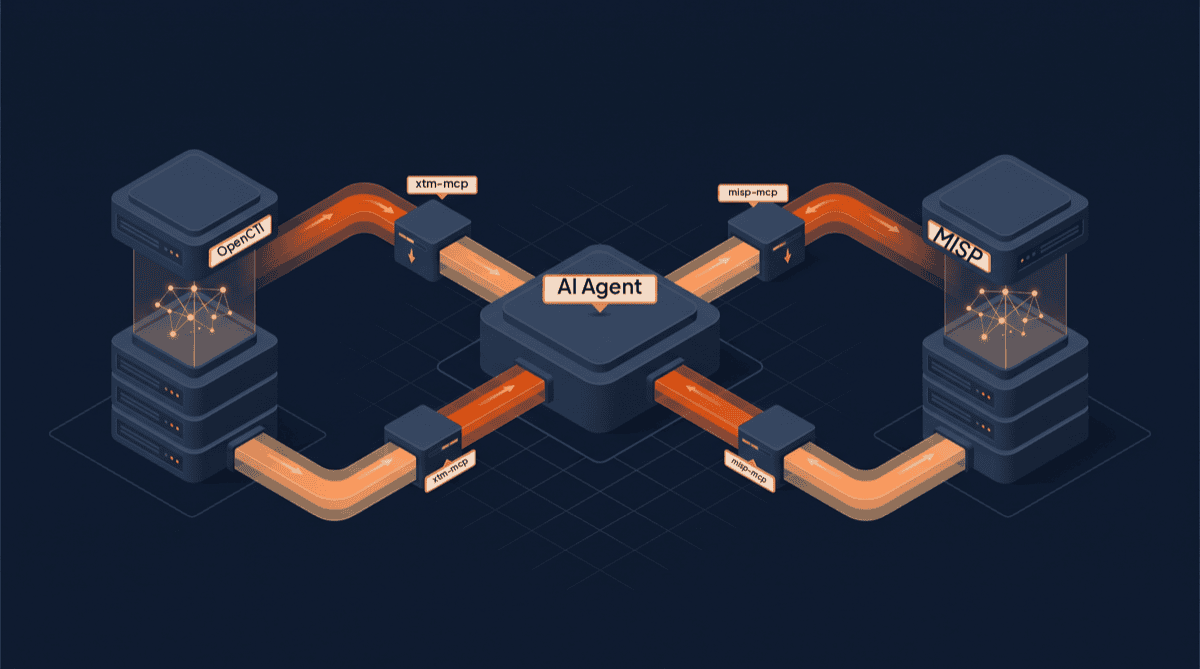
Wiring OpenCTI to an agent
The official server takes an unusual approach. Instead of a curated tool per entity type, xtm-mcp exposes nine generic GraphQL tools: the agent can list the schema's types, inspect their definitions, validate a query, and then execute the GraphQL it wrote itself. That makes it extremely flexible, since anything the OpenCTI API can answer, the agent can ask, but it leans on the model being good at GraphQL, and it comes with one gotcha that will cost you an hour if you do not know about it: GraphQL introspection is disabled by default on OpenCTI, so the schema-exploration tools return nothing until you enable it in the platform configuration.
The server is Python, and the configuration for Claude Code or Claude Desktop looks like this:
{
  "mcpServers": {
    "opencti": {
      "command": "python",
      "args": ["-m", "opencti_mcp.server"],
      "env": {
        "OPENCTI_URL": "http://localhost:8080",
        "OPENCTI_TOKEN": "<your-token>"
      }
    }
  }
}
The token is the same kind of API token you set as OPENCTI_ADMIN_TOKEN in the Docker guide's .env, but do not reuse the admin one. Create a dedicated user for the agent under Settings, then Security, give it read permissions and nothing more, and issue the token from that account. Anyone holding a token has whatever access its user has, and an agent only needs to read.
If you would rather have curated tools than model-written GraphQL, the community server pycti-mcp is the best-maintained alternative: it wraps Filigran's own pycti client library, ships on PyPI so a single uvx pycti-mcp@latest runs it, and offers four focused lookup tools covering observables, adversaries, reports, and indicators, with output shaped for a model to read. For pure enrichment work that is often all you need, and its behaviour is easier to predict than free-form queries.
And keep one eye on your release notes. When the embedded server ships, MCP support becomes a checkbox on the platform rather than a separate process, and the setup above reduces to pointing your agent at the OpenCTI URL itself.
Wiring MISP to an agent
The official misp-mcp server gives the agent fourteen read-only tools that map cleanly onto how analysts actually query MISP: searching events, attributes, and objects, fetching any of them by ID, exploring tags and taxonomies, searching the galaxies that hold threat actor, malware, and ATT&CK context, and listing feeds. Nothing in it can create, modify, tag, or publish, so the worst a misbehaving agent can do is read.
One install gotcha: the README mentions a pip package, but at the time of writing misp-mcp is not on PyPI, so install it from source:
git clone https://github.com/MISP/misp-mcp.git
cd misp-mcp
pip install -e .
That gives you a misp-mcp command, and the configuration is:
{
  "mcpServers": {
    "misp": {
      "command": "misp-mcp",
      "env": {
        "MISP_URL": "https://misp.example.com",
        "MISP_API_KEY": "<your-key>",
        "MISP_VERIFYCERT": "true"
      }
    }
  }
}
If you installed into a virtual environment, command needs the full path to the misp-mcp executable inside that environment, which is the most common reason the server fails to start with no visible error.
Two MISP-specific notes. First, self-signed certificates are common on self-hosted MISP, and the switch to relax verification here is MISP_VERIFYCERT, following PyMISP's naming, not the MISP_VERIFY_SSL you may have seen in older tutorials; set it to false only for a lab instance on a network you trust. Second, MISP API keys inherit the role of the user they belong to, so even though this server cannot write, issue the key from a dedicated read-only user. It keeps the audit log honest about what the agent looked at, and it means a leaked key is a nuisance rather than an incident.
And read-only does not mean write-back is off the table. A good part of the value in wiring an agent to MISP sits in the write direction: turning a vendor report or a finished piece of analysis into a properly structured MISP event, with the attributes, tags, and galaxy references attached, is exactly the kind of manual work an agent should be taking off your plate. What read-only means is that today the write path does not go through the official MCP server. A coding agent can do it directly with PyMISP or the REST API, using a key from a second user that can create events but not administer the instance, and that is the pattern our own open CTI skills use. MCP for asking questions, a scoped client for writing back, and an analyst's glance at the event before it publishes: that combination gets you the labour saving without handing a language model administrative reach.
What enrichment looks like once both are connected
Here is the payoff, using the kind of task that lands on every CTI desk. A suspicious domain comes in from an incident ticket, and you ask your agent to work it up.
With both servers configured, the agent checks MISP first and finds the domain as an attribute on two events from a sharing community, tagged with a familiar intrusion set. It pulls both events and reads the surrounding attributes: sibling domains, a hash, a slice of infrastructure. Then it turns to OpenCTI, where your MITRE ATT&CK data and vendor reporting live, resolves the intrusion set in the galaxy cluster it found, and pulls the actor's known techniques and recent reports. It reconciles the two pictures, notes that the sharing-community sighting is recent while the vendor reporting is six months old, and drafts a short assessment with the sources and their vintage attached, plus the sibling infrastructure as candidate blocks for your detection team.

In a chat window that is forty minutes of tab-switching and copy-paste. Through MCP it is a few minutes of the agent querying both platforms itself, and every fact in the draft traces back to a record in a system you run. This is the integration layer from our guide to AI for threat intelligence made concrete: the agent calling your tools, with your keys, on your infrastructure. Pair it with a set of analytical skills, as covered in our guide to Claude Code for threat intelligence, and the same session that queried both platforms can rate the sources and run the structured analysis on what came back. The judgement on what the assessment says, and whether it goes anywhere, stays with you.
Keep the blast radius small
The security posture for all of this fits in a paragraph, and it is mostly the same discipline you already apply to any API client. Give the agent its own user on each platform, scoped to what its workflow actually needs: read for the query side, a separate create-but-not-administer user if you add write-back. Keep the MCP side read-only, which the official servers are anyway, and treat any community server with built-in write tools as something to test against a scratch instance first. Keep certificate verification on outside the lab. And log what the agent's user does for the first few weeks, not because the agent is malicious but because watching its queries is the fastest way to learn what it is actually good at.
Where this fits
Running the servers yourself, against platforms you host, is the build-it-yourself end of AI-assisted CTI, and it is a genuinely good place to start: the open-source CTI skills run in the same agents these servers connect to, and together they make a capable single-analyst workstation. The managed Liberty91 platform sits at the other end, where the integration, enrichment, and analysis run continuously against your intelligence requirements without you maintaining the plumbing. Wherever you land between those two, the pattern in this post is the foundation: the agent comes to your data, your keys stay yours, and the analyst stays in charge of the call.
Frequently asked questions.
Is there an official OpenCTI MCP server?
Yes. Filigran released xtm-mcp, an official open-source MCP server, in March 2026, and bundled it with OpenCTI 6.8. In July 2026 the standalone repository was archived as the capability moves into the platform itself: an embedded MCP server, speaking streamable HTTP at the platform's own /mcp endpoint, is on Filigran's public roadmap but has not shipped at the time of writing, in either edition. Until it does, the archived server still works, and the community pycti-mcp server is a well-maintained alternative with curated lookup tools.
Is there an official MISP MCP server?
Yes. The MISP project publishes misp-mcp under its official GitHub organisation, written by one of MISP's core maintainers and released in April 2026. It is built on PyMISP, runs over stdio, and is deliberately read-only, exposing fourteen tools for searching and reading events, attributes, objects, tags, taxonomies, galaxies, and feeds. At the time of writing it is not yet on PyPI, so it installs from source.
What is an MCP server in threat intelligence terms?
An MCP server is a small program that presents an existing API to an AI agent as a set of typed, documented tools, using the Model Context Protocol standard. For a threat intelligence platform it means the agent can search events, fetch indicators, or resolve a threat actor on your instance directly during its work, instead of relying on whatever context you pasted into the prompt. The server handles authentication and translates each tool call into real API requests, so access is governed by the token you issued, like any other API client.
Can an AI agent write to OpenCTI or MISP through MCP?
Not through the official servers today: the MISP server is strictly read-only, and the official OpenCTI tooling has so far been read-focused. That is a statement about the servers, not about the workflow, because writing back is one of the most useful things an agent can do, turning a report or a finished analysis into a structured event or entity without the manual data entry. Until the official servers grow write support, the practical route is the platform's own client library or API, PyMISP for MISP or pycti for OpenCTI, called by the agent with a key scoped to create but not administer, and with an analyst reviewing the result before it is published or shared.
How is an MCP server different from an OpenCTI connector or a MISP feed?
They move data in opposite directions for different consumers. Connectors and feeds move intelligence between systems in bulk, on a schedule, machine to machine: a feed pushes indicators into your platform whether anyone asked or not. An MCP server moves answers to an agent on demand: nothing happens until the model asks a question mid-task, and what comes back is shaped for the model to reason over rather than for a database to ingest. A healthy setup uses both, with connectors and feeds filling the platform and MCP letting the agent interrogate it.
Do I need Claude to use these MCP servers?
No. MCP is an open standard, and the servers in this guide work with any client that implements it, including Claude Code and Claude Desktop, Cursor, and a growing list of agent frameworks and IDEs. The configuration snippets in this guide use the JSON format shared by Claude's tools, but the same command, arguments, and environment variables translate directly to any other MCP-capable client.