
Recent Threats dashboard.
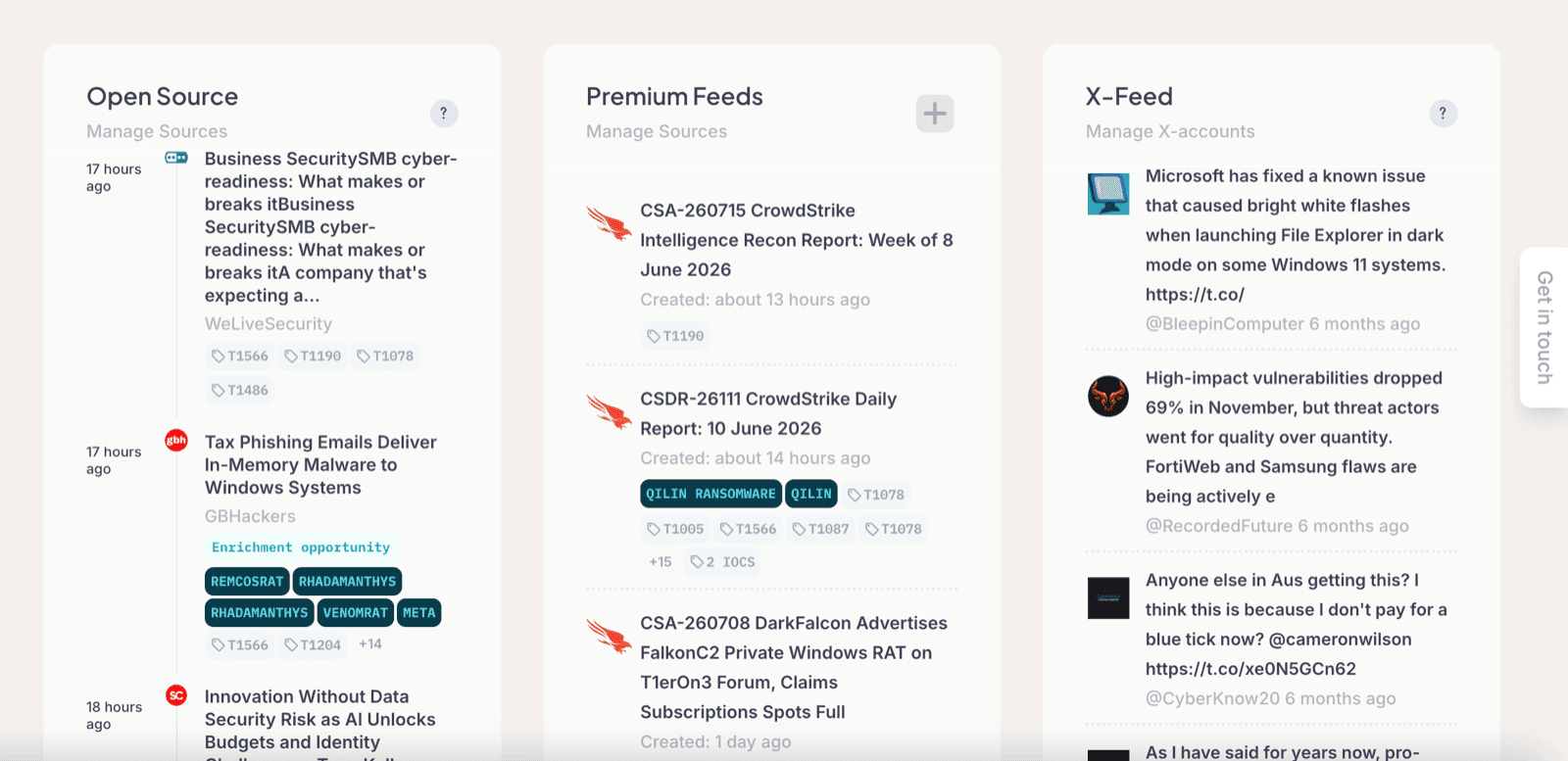
The Recent Threats dashboard is your main entry point into Liberty91. It shows the most recent Events in the threat landscape, ordered chronologically so the newest reporting sits at the top. By default it presents three columns: Open Source on the left, Premium Feeds in the middle, and X (formerly Twitter) on the right.
The three columns
Each column groups Events by where they came from.
- Open Source (left) covers everything freely available on the internet, such as security blogs, vendor write-ups, government advisories, and vulnerability reports.
- Premium Feeds (middle) covers reporting that is not open to everyone. This includes a dark web feed if you have turned it on, premium vendor reporting brought in through a paid account or integration, and reports you import yourself.
- X (right) is a standalone feed that lives on the far right of the screen and surfaces new posts from the security researchers you follow.
Ransomware leak-site victim claims arrive in the feed alongside everything else, one card per claim, titled after the group and the company it names. Read them as the attacker's own claim rather than as a confirmed breach: the Ransomware.live module page explains how they are graded and how to be alerted when one names a domain you care about.
What each Event card shows
Every Event displays the name, the source, and all of the MITRE ATT&CK codes the platform found described in that report, so you can read the technical shape of a report at a glance. Each card also carries the source's own icon, so a vendor write-up, a news article, and a leak-site post are distinguishable at a glance. Dark-web forum posts share one generic forum icon, because onion sites cannot be fetched for a favicon.
Any Threat Entities you hold in your Threat Library are colour-coded where they appear on a card, which lets you identify what is being described without opening the Event:
| Entity type | Colour |
|---|---|
| Threat Actors | Orange |
| Malware | Teal |
| Vulnerabilities | Black or white, depending on light or dark mode |
Enrichment Opportunities
In some cases an Event card surfaces an Enrichment Opportunity. This appears when the Event contains at least one Indicator of Compromise that an enabled Module has matched to a known threat.
For example, if you have MISP connected and an IOC mentioned in the report is also found in your MISP instance, or if OTX, CrowdStrike, or Group-IB links that IOC to a particular malware or threat actor, the platform surfaces the match. Accepting the match records the association between that indicator and the entity, so the link the Module found is captured against the entity's profile.
Enrichment Opportunities depend on the Modules you have turned on. Enabling a free Module like AlienVault OTX is a quick way to start seeing IOC-based links appear on your Events. See how IOC enrichment and decay scoring work.
Where to go next
The Recent Threats dashboard answers "what is new right now." From here:
- Team dashboards give each part of your team a view built around what they are responsible for.
- Threat Events explain how the reporting behind these cards is matched together, so one occurrence reads as one story rather than as a stack of near-duplicates.
Frequently asked questions
Why are some Events shown in a separate Premium Feeds column?
The Premium Feeds column is for reporting that is not freely available: a dark web feed if you have enabled it, premium vendor reporting you bring in through a Module, and your own imports. Freely available internet reporting appears in the Open Source column instead.
What does an Enrichment Opportunity on an Event mean?
It means the Event contains at least one Indicator of Compromise that an enabled Module has matched to a known threat. Accepting it records the association between that indicator and the entity, so the link the Module found is captured against the entity's profile.