
How Modules work.
Modules are how Liberty91 connects to the outside world. They fall into three types: Collection modules pull reports and data in, Analysis modules enrich what comes in, and Production modules push your finished intelligence out. Most modules need nothing more than a few clicks, though premium Collection modules ask you to bring your own licence and API key for the source you have subscribed to. This page explains the three types so you can decide which Modules to turn on.
What are the three Module types?
Use this table to find the right Module for what you want to do, then open its page for setup steps.
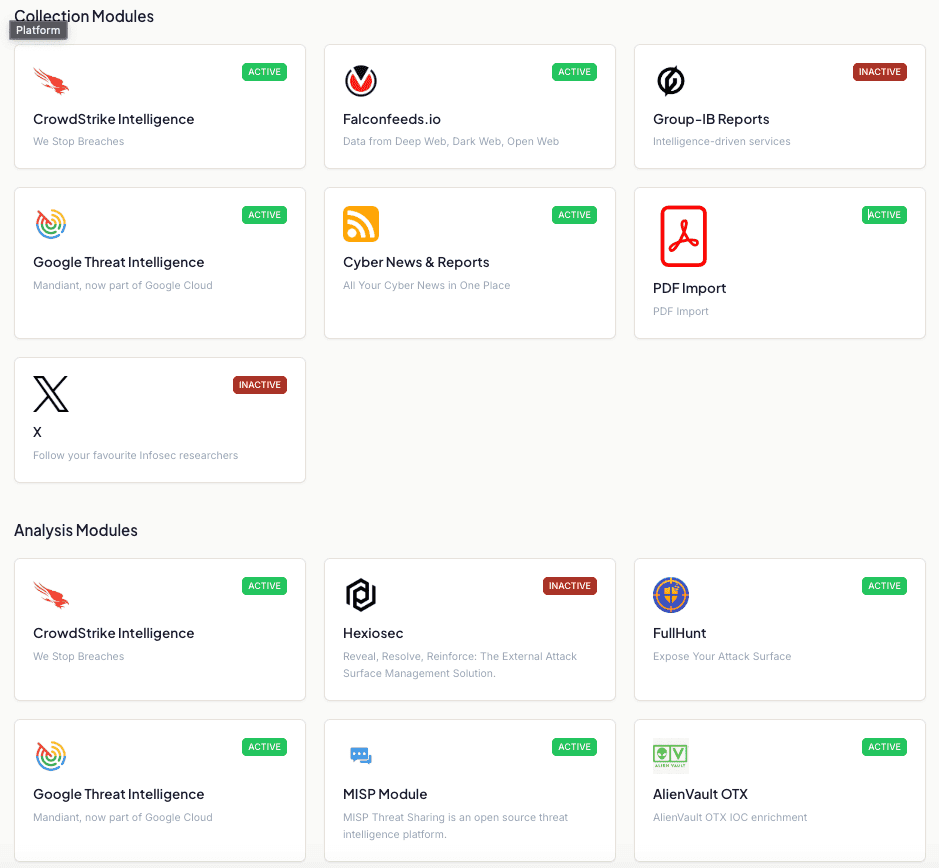
| Type | What it does | Example Modules |
|---|---|---|
| Collection | Pulls reports and data from a source, either open source or a premium feed where you bring your own licence and API key | CrowdStrike Intelligence, FalconFeeds, Group-IB, Google Threat Intelligence, Cyber News and Reports, PDF Import, X (Twitter), Ransomware.live |
| Analysis | Enriches incoming data, whether that is your attack surface or the IOCs found in Events | FullHunt and Hexiosec for attack surface; MISP, CrowdStrike, Google Threat Intelligence, free AlienVault OTX, URLScan, GreyNoise, Shodan, AbuseIPDB, Censys, and ReversingLabs for IOC enrichment |
| Production | Sends your analysis and finished products out to other systems | Miro, MISP, and Webhooks to your SIEM or SOAR |
Start with a free one. Five of the IOC enrichment modules work with a free account at the provider: AlienVault OTX, GreyNoise, AbuseIPDB, URLScan and Censys. Activating one takes about a minute: create the API key on the provider's side, paste it into the module, and from then on every incoming indicator is run through it. Free keys come with limited API credits, so keep an eye on usage. Modules that know about threat actors or malware families also enrich your Threat Library, not only the indicators.
Collection modules and Threat Events
Collection modules do not just fill a feed. The reporting they bring in feeds the Threat Event layer, where reports about the same real-world occurrence are matched together, so a breach covered by your licensed vendor reporting and by three news outlets reads as one occurrence with four sources rather than four separate items.
This applies to reporting sources generally, including the reports you upload yourself and the ransomware leak-site victim claims that Ransomware.live collects. Analysis modules do not contribute, because enriching an indicator is not reporting on an occurrence, and neither do production modules, which send your finished work outward.
Your licensed and uploaded reporting stays yours. Anyone without the same entitlement does not see it: not the report, not its contents, and not its existence in the source and report counts. If the only reporting on an occurrence is reporting you are not entitled to, the Threat Event does not appear for you at all. Private and uploaded reports also never write to the shared record itself, so the victims, technologies, dates, and credibility attached to a Threat Event are always computed from public reporting. See Threat Events for the full picture.
How the types fit together
Collection modules feed your Recent Threats dashboard with Events, from news and vendor reporting through to ransomware leak-site victim claims. As those Events arrive, Analysis modules enrich them: attack-surface tools like FullHunt keep your Assets current, and IOC enrichment tools check every indicator against MISP, CrowdStrike, Google Threat Intelligence, or the free AlienVault OTX. Six further enrichment providers work the same way once you paste in a key of your own: URLScan on URLs and domains, Shodan on IP addresses and domains, GreyNoise, AbuseIPDB and Censys on IP addresses, and ReversingLabs on file hashes, URLs, domains and IP addresses from your own appliance. Once you have produced an alert or a report, Production modules route it onward, whether that is a board in Miro, a finished report into MISP, or a webhook into your SIEM or SOAR.
Some modules sit in more than one type. CrowdStrike Intelligence, Google Threat Intelligence, and MISP each act as both a Collection source and an enrichment or Production endpoint, so you configure them once and use them in several ways.
Frequently asked questions
What are the three Module types in Liberty91?
Collection modules pull reports and data in, Analysis modules enrich what comes in such as IOCs and Assets, and Production modules push your finished intelligence out to other systems.
Do I need my own licence to use a Module?
Only for premium Collection modules, where you bring your own licence and API key for the source you have subscribed to. Most Modules need nothing more than a few clicks.
Can other customers see the reporting my licensed Modules bring in?
No. Anyone without the same entitlement sees neither the report, its contents, nor its existence in the source and report counts. Licensed and uploaded reporting also never writes to the shared Threat Event record.