
Google Threat Intelligence module.
The Google Threat Intelligence (GTI) module does three things: it collects GTI reports of the types you choose, it enriches the profiles of entities in your Threat Library, and it enriches the IOCs that come in with your Events. To use it you need a paid Google subscription and your VirusTotal API key. This page covers where to find the key and how to configure the module without overwhelming your tenant.
You need a paid Google Threat Intelligence subscription. The module reads your key from VirusTotal, which is part of the same Google offering.
What the GTI module does
- Report collection. It imports GTI reports as Events. You choose which report types to receive.
- Entity profile enrichment. When an actor turns up in your Threat Library, Liberty91 reaches out to GTI, finds their profile for that entity, and uses it in the enrichment and associations.
- IOC enrichment. For every Event, if an IOC matches something GTI associates with a malware family or threat actor, the platform surfaces that association as an Enrichment Opportunity. Accepting it records the association against the entity.
How to connect Google Threat Intelligence
Connecting the module takes two steps: copy your key from VirusTotal, then configure the module in Liberty91.
Step 1: Copy your API key from VirusTotal
- Go to virustotal.com and log in.
- Click your username in the top right and select API key from the drop-down.
- Click the copy icon next to your key. The key stays blurred unless you click the eye icon, but you do not need to reveal it to copy it.

Step 2: Configure the module in Liberty91
- Go to Modules and open the Google Threat Intelligence module under Collection modules.
- Paste the API key you copied from VirusTotal into the key field.
- Select the report types you want to include.
- Choose the source types you want to include.
- Click Update. When it works, "Google Threat Intelligence Module is active" appears under the page title.
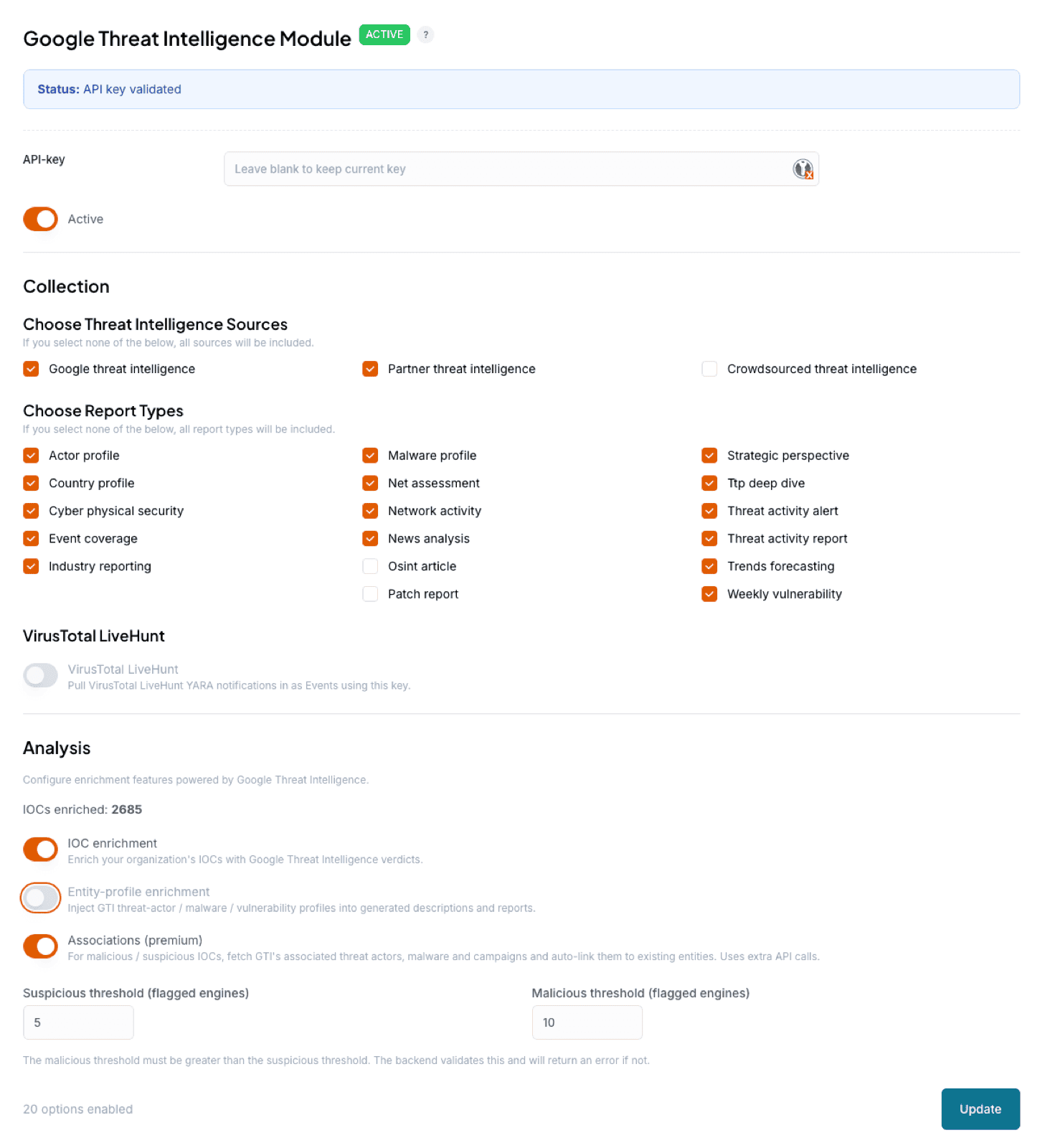
Leave OSINT Articles and Patch Reports unchecked. Both carry enormous volume and will quickly clog and dominate your dashboards. For the same reason, do not ingest GTI's open-source reporting through the source types: it is already covered by other modules and will overwhelm your tenant.
The module consumes about 96 API calls per day, roughly 2976 per month, one every 15 minutes. New reports start ingesting immediately. If you also want to import the results of your VirusTotal LiveHunts, you can turn that on in this module. VirusTotal is part of the same Google offering, so its collection is configured here rather than separately.
Frequently asked questions
Where do I get the API key for the GTI module?
From VirusTotal, which is part of the same Google offering. Log in, open API key under your username, and copy it. You do not need to reveal the key to copy it.
Which GTI report types should I avoid?
Leave OSINT Articles and Patch Reports unchecked, and do not ingest GTI's open-source reporting through the source types. All three carry enormous volume, and the open-source material is already covered by other modules.
Do I configure VirusTotal separately?
No. VirusTotal is part of the same Google offering, so its collection, including VirusTotal LiveHunt results, is turned on inside this module.