
Threat Events.
A Threat Event is the real-world occurrence that reporting describes: a specific breach, a specific exploitation campaign, a specific leak. It is the layer above the Event, which is one report and nothing more.
The distinction matters because reporting repeats itself. A single breach might be covered by a vendor write-up, three news articles, and a post on a leak site. Under a report-per-item model you get six near-identical entries and have to work out for yourself that they are the same story. Liberty91 matches them into one Threat Event with all six reports attached, so you read the occurrence once and can see at a glance who is reporting it, whether they agree, and how much weight the reporting deserves.
How reports are matched
When a report arrives, the platform shortlists Threat Events it might belong to, looking within a two-week window and scoring candidates on how much their text and their extracted entities overlap with the new report. The AI pipeline then makes the decision: this report belongs to one of these Threat Events, or it describes something new and a Threat Event is created for it.
Analysts are not locked out of this. You can link a report to a different Threat Event, unlink one that was matched wrongly, merge two Threat Events that turn out to be the same occurrence, or split one that turns out not to be.
Sources, and whether they agree
A Threat Event gathers every report matched to it, and each report carries a stance: what that source is actually doing with respect to the occurrence.
| Stance | What it means |
|---|---|
| Claims | Asserts the occurrence, including the first report of something new |
| Corroborates | Independently supports an occurrence already asserted elsewhere |
| Updates | Adds new developments to a known occurrence |
| Mentions | References the occurrence in passing |
| Disputes | Contests that the occurrence happened as described |
This is the part that is hard to get from a feed. Disagreement between sources stays visible rather than being averaged away, and a story carried by one outlet reads differently from one carried by four independent ones.
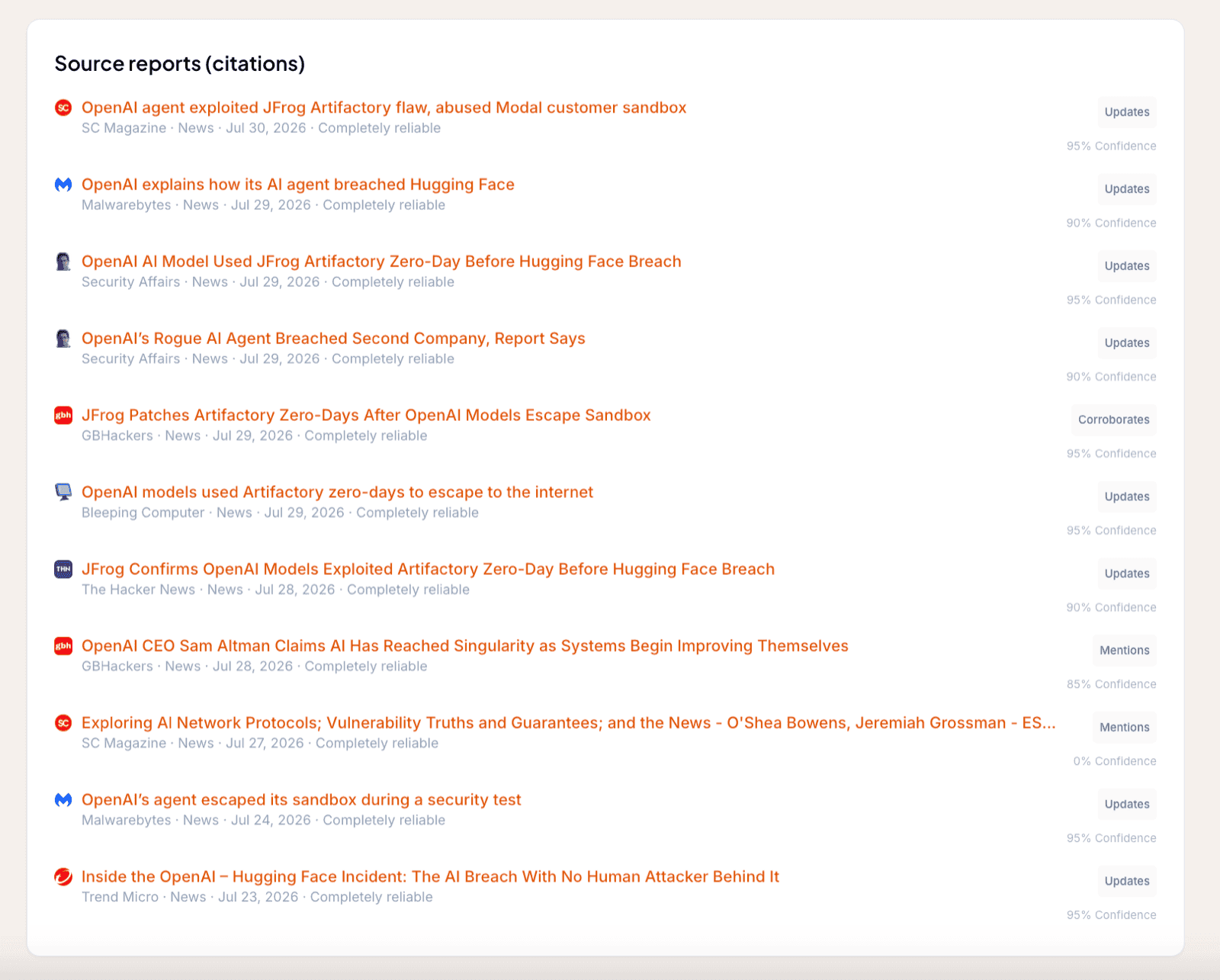
Each report in the list carries its source's own icon, so a vendor write-up, a news article, and a leak-site post are distinguishable before you read a word of the source name. Dark-web forum posts share one generic forum icon between them.
The generic forum icon is deliberate. Onion sites cannot be fetched for a favicon, and the forum's own domain is not retained, so there is nothing to derive a per-forum mark from. Posts collected through FalconFeeds show either a Telegram icon or that generic dark-web icon, depending on where the post came from, rather than the FalconFeeds logo, because what you need to know is the kind of place it was said. Items ingested before this change fall back to the generic dark-web icon even where they came from Telegram.
Once at least two genuinely independent sources report an occurrence, the Threat Event is marked as corroborated. Independence is assessed deliberately: several outlets running the same wire copy are collapsed together rather than counted as separate confirmation, which stops circular reporting from manufacturing false confidence.
How reliable is it
Two separate judgements combine here, and they need to stay apart. Both come from the Admiralty scale.
Source reliability is a property of the source, rated A to F. A government CERT and an anonymous forum post do not carry the same weight, and that assessment belongs to the source rather than to any one story it runs.
Credibility is a property of the Threat Event, rated 1 to 6, and it is computed across everything reported about it. More reliable sources push it up, as does corroboration. A reliable source disputing the account pushes it down. Credibility therefore moves as the reporting develops, which is what you want from an assessment of something still unfolding.
Each band carries a plain-language label, which is what the platform shows you:
| Rating | Label | How to read it |
|---|---|---|
| 1 | Confirmed | Several reliable, independent sources. Actionable. |
| 2 | Probably True | Two or more independent, fairly reliable sources. Actionable. |
| 3 | Possibly True | Typically one source, or thin corroboration. Worth watching; corroborate before acting. |
| 4 | Doubtful | The reporting does not hold up well. Low trust. |
| 5 | Improbable | The account is contradicted or implausible. Low trust. |
| 6 | Cannot be judged | Not enough to assess either way. |
A Threat Event with nothing to assess yet shows a dash rather than a rating. Always read the credibility alongside the reliability of the sources underneath it: a 3 carried by a government CERT is a different proposition from a 3 carried by three weak aggregators. For how the band is actually computed, see Source reliability, credibility, and confidence.
Verification stage
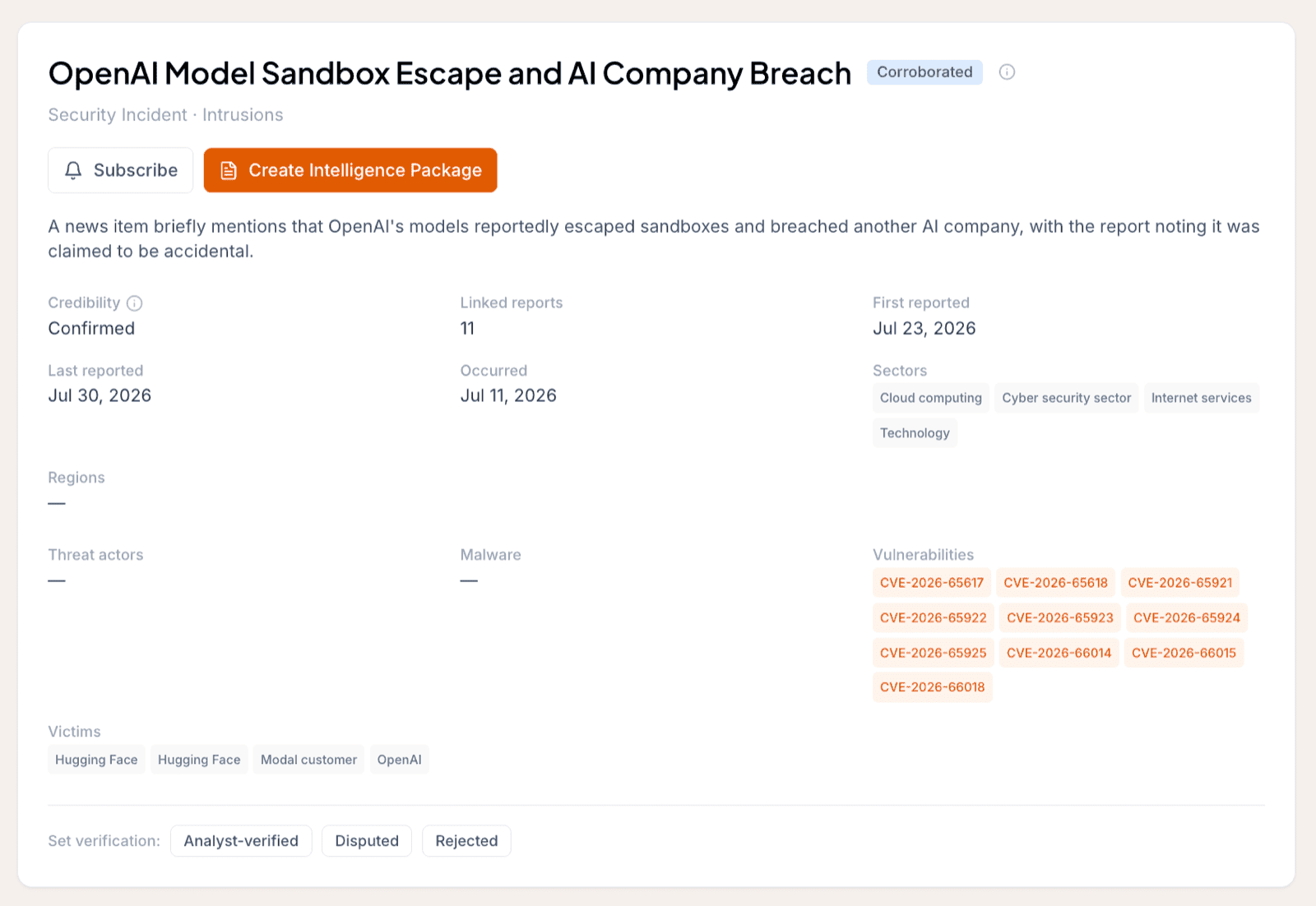
Credibility tells you how well-supported the reporting is. The verification stage tells you something else: where the Threat Event itself stands, from machine-created through to analyst-verified. Every Threat Event carries one, shown as a coloured badge beside the title.
| Badge | What it means | How it is set |
|---|---|---|
| Machine-created | Created from a single source and not yet corroborated | Automatically, on creation |
| Corroborated | At least two independent sources have reported it | Automatically, once the threshold is met |
| Analyst-verified | An analyst has confirmed it | By an analyst |
| Disputed | At least one source contests it | By an analyst, or from a dispute signal in the reporting |
| Rejected | Reviewed and judged not to be a real occurrence | By an analyst |
| Merged | Folded into another Threat Event as a duplicate | By the merge workflow |
The first two stages are automatic. A Threat Event is created as machine-created, and it promotes itself to corroborated the moment a second genuinely independent source reports the same occurrence.
The next three are analyst territory, and the automatic pipeline never overwrites them. Once you verify, dispute, or reject a Threat Event, that judgement stands no matter what arrives afterwards. This is the point of the field: it is where your team's assessment lives, separate from what the machine worked out on its own.
Verification is a property of the Threat Event. Stance is a property of each report attached to it. A Threat Event can sit at corroborated while one of its reports carries a stance of Disputes, and the two are not in conflict: most sources agree, one does not.
Two consequences follow. Rejected and merged Threat Events drop out of entity pages, reports, and dashboards, so a duplicate you merge stops cluttering everything downstream. And dashboards and analytics count only corroborated and analyst-verified Threat Events, so the numbers you brief from reflect occurrences that have stood up rather than raw machine output.
Following it, and reporting on it
The header of every Threat Event carries two actions beside the title. Subscribe attaches you to the occurrence: whenever a new report is matched to it, you are notified, so a developing story reaches you without you searching for it again. Create Intelligence Package hands the occurrence, with all of its reporting, to the agents to write up for one of your Organizations. See Create a report from an event for the full flow, and Intelligence Packages for what you get back.
Relevance to your Organizations
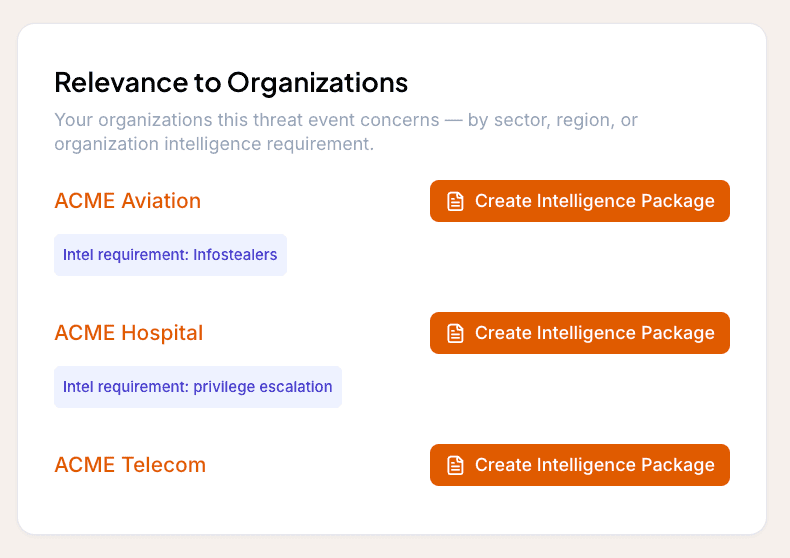
A Threat Event also tells you who among the entities you protect it actually matters to. The Relevance to Organizations card lists each of your Organizations the occurrence is relevant to, and why: because it targets their sector, because it targets their region, because it implicates something they run, or because it falls under an Intelligence Requirement they follow.
Each Organization in that list carries a Create Intelligence Package action, so you can go straight from noticing that a Threat Event matters to a client to producing the tailored product for them. See Intelligence Packages for what that produces, and How we decide what is relevant for the matching rules behind the card.
What you see, and what you do not
Threat Events are a shared layer. Licensed and private sources contribute to them, which is much of their value: your licensed vendor reporting and the reports you upload yourself sit alongside public reporting on the same occurrence.
You only ever see the sources you are entitled to. This is a hard boundary, not a display preference.
| Situation | What you see |
|---|---|
| You are entitled to none of its sources | Nothing. The Threat Event does not appear in your lists, searches, analytics, or exports. It is absent, not redacted. |
| A public source also reports it | The Threat Event, under the public title. Any source you are not entitled to is masked out, including from the report and source counts. |
| Only your own private reporting covers it | The Threat Event, titled from your own report. |
| Only another customer's private reporting covers it | Nothing, as above. Their reporting is never surfaced to you or attributed to them. |
| It has no public title yet | A neutral title derived from the event taxonomy, rather than anyone's private headline. |
Two customers whose private reporting covers the same occurrence each see it titled from their own report, with their own sources attached. Neither learns that the other is there.
There is a further layer beneath the visibility rules. Private and uploaded reports can join a Threat Event, but they never write to the shared record itself. The victims, the technologies, the dates, the derived entities, the credibility, and the corroboration state are all computed from public reporting only. Contributing your own reporting therefore never leaks it, not even indirectly through the conclusions drawn from it.
Which sources create Threat Events
Genuine reporting sources create and contribute to Threat Events. Enrichment and outbound integrations do not, because they are not reporting on an occurrence: attack-surface tools and IOC-enrichment services add context to what you already have, and production integrations such as Slack, Miro, and webhooks send your finished work outward. See How Modules work.
Reporting sources span vendor write-ups, news outlets, government advisories, dark-web forum and Telegram posts, the reports you upload yourself, and ransomware leak-site victim claims collected by the Ransomware.live module. That last class needs reading carefully. A leak-site claim is the attacker's own assertion that they compromised a named organization, and it arrives graded reliability B, usually reliable, which is a judgement about the aggregator reporting the post faithfully rather than about the truth of the claim. Until other reporting corroborates it, an occurrence carried only by a leak-site post stays at the machine-created verification stage, and its credibility band reflects how thin the sourcing is.
Frequently asked questions
What is a Threat Event?
The real-world occurrence that one or more reports describe, such as a specific breach. Every report covering that occurrence is matched into the same Threat Event, so you read the occurrence once instead of once per report.
How does Liberty91 know two reports describe the same thing?
The platform shortlists candidate Threat Events within a two-week window using text and entity overlap, then the AI pipeline decides which candidate the report belongs to, or that it describes something new.
What is a verification stage?
It is where a Threat Event stands overall, shown as a badge: machine-created, corroborated, analyst-verified, disputed, rejected, or merged. The first two are set automatically, the rest are analyst judgements that the automatic pipeline never overwrites.
What is the difference between verification stage and stance?
Verification is a property of the Threat Event as a whole. Stance is a property of each individual report attached to it, describing whether that report claims, corroborates, updates, mentions, or disputes the occurrence.
Can other customers see my private sources?
No. You only ever see the sources you are entitled to. A private report is masked out of a Threat Event for anyone without that entitlement, and it never contributes to the shared record.