
Intelligence Packages.
An Intelligence Package is the thing you actually deliver. Everything else in Liberty91, the events, the matching, the entity records, the relevance judgements, feeds this one artifact: a report written for one specific Organization, grounded in the reporting behind it, with the machine-readable material a defender needs attached to it.
Packages live on the Organization they were generated for, under Intelligence Packages, and once staged or sent they also appear in the Mailroom.
Kinds of package
Packages differ by what they were built from, and the kind is shown on every package.
| Kind | Built from | Typically triggered by |
|---|---|---|
| Event | A single occurrence | You, from a Threat Event you want reported on |
| Threat | A set of occurrences you selected | You, from search results or a filtered list |
| Entity | A Threat Actor, malware family, or vulnerability | You, from an entity in the Threat Library |
| Daily report | Everything relevant to the Organization since the last one | The Morning Report schedule |
| Monthly | The month's relevant reporting for the Organization | The monthly schedule |
The scheduled kinds are the ones most teams end up living on, because they arrive without anyone asking. Daily reports are labelled Daily report wherever they appear, so an automated digest never reads as something a colleague put together by hand.
What a package contains
Every package carries a written report and, depending on what was selected for the Organization, a set of machine-readable artifacts alongside it.
| Artifact | What it is | Who it is for |
|---|---|---|
| Markdown report | The written intelligence narrative | The person reading it |
| IOC CSV | The indicators, ready to import or block on | The SOC |
| STIX 2.1 bundle | Entities and their relationships, structured | A TIP such as MISP or OpenCTI |
| SIGMA rules | Vendor-agnostic detection rules | Detection engineering |
| Branded PDF | The formatted report under your own branding | The stakeholder's inbox |
The first four show as an icon strip on the package and in the Mailroom. The PDF is different: it travels as an email attachment rather than as an artifact attached to the package, so it does not appear in that strip. See the Mailroom artifact legend for the icons, and Customise your Morning Reports for choosing which artifacts a given Organization receives.
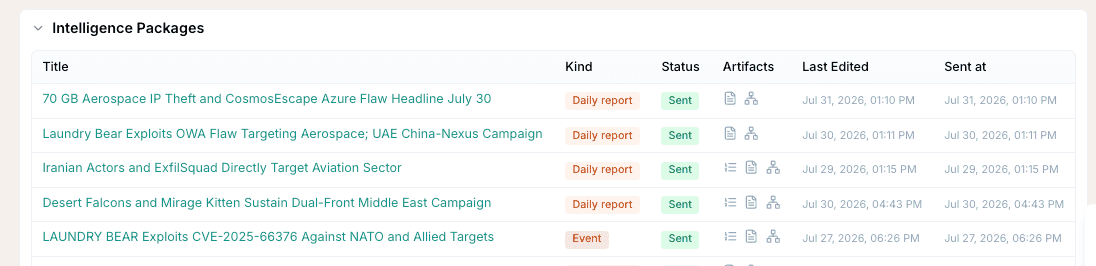
The lifecycle
A package moves through a small set of states, shown on the package itself.
| Status | What it means |
|---|---|
| Generating | The agents are researching and writing it. This takes a few minutes. |
| Draft | Finished and waiting on you. Fully editable. |
| Staged | Queued for mailing with its recipients chosen, not yet sent. |
| Sent | Delivered, and now part of the Mailroom's send history. |
| Failed | Generation did not complete. Regenerate it. |
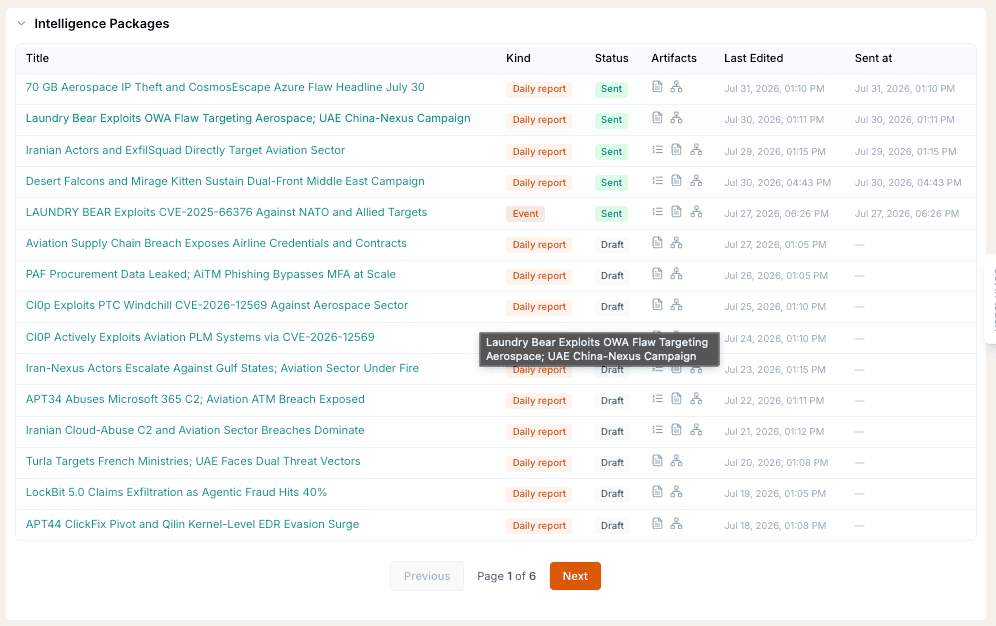
In practice the flow is: generate, review, stage, send.
- Generate. From a Threat Event, from selected search results, from an entity, or on a schedule. Pick the Organization; the package is written for that Organization specifically.
- Review. Open the draft and read it. Edit anything that needs editing. This is the human-in-the-loop step, and it is the point of the draft state.
- Stage. Click Stage for Mailing and choose the recipients from that Organization's Stakeholders.
- Send. It goes out and becomes trackable in the Mailroom, with delivery status per recipient.
Nothing reaches a Stakeholder without passing through the draft state first. Generation produces a draft, never a send, including for the scheduled kinds where the schedule handles the staging step for you.
Where to go next
- Create a report from an event for the single-occurrence flow.
- Report on a threat entity or requirement for building from an entity or an Intelligence Requirement.
- Generate a report from search results for building from a filtered set.
- Send a report to a stakeholder for staging and sending in full.
Frequently asked questions
What is an Intelligence Package?
The finished intelligence product Liberty91 produces for one Organization: a written report plus the machine-readable artifacts that go with it, such as an IOC CSV, a STIX bundle, and SIGMA rules. It is what your Stakeholders actually receive.
Where do I find my Intelligence Packages?
On the Organization tab of the Organization they were generated for, in the Intelligence Packages section. Packages that have been staged or sent are also tracked in the Mailroom.
What is the difference between staged and sent?
Staged means the package is queued for mailing with its recipients chosen but has not gone out. Sent means it has been delivered and is now part of the Mailroom's send history.
Can I edit a package before it goes out?
Yes. A package sits in draft until you stage it, and drafts are fully editable. Reviewing and editing before staging is the intended workflow rather than an exception.