
Quick Start.
Liberty91 starts working before you do. By the time you log in for the first time, the AI agents have already collected the recent reporting from open sources, matched every report about the same occurrence into one Threat Event, and enriched each one with its indicators, techniques and threat entities. Your dashboard and your Threat Library are populated on day one.
So the first session is mostly reading. This page walks you from the dashboard to a finished, sent Intelligence Package, then shows the few things that make everything after that specific to your organization. Each step links to the full guide.
Your first session
Set aside half an hour. Every step here works on a new Analyst account with nothing configured. On the Community tier, steps 4 and 5 depend on features that tier does not include, and step 8 alerts your own inbox only; everything else works the same way.
- Read the dashboard. The time range at the top governs the whole page, from the last 24 hours to the last 90 days. Most reported ranks the Threat Events carrying the most reports, which is a fair proxy for what the industry is paying attention to. Top techniques shows the MITRE ATT&CK techniques used most in those occurrences, with the change against the previous period, and Most relevant mitigations ranks the mitigations that follow from them. Every entry clicks through to the Threat Events behind it, and the panels can be dragged into whatever layout suits you. See Home dashboard.
- Open a Threat Event and subscribe to it. Start with the top entry in Most reported. A Threat Event gathers every report about one occurrence on a single page, and the six parts of that page are described below. Click Subscribe in the header and you are notified whenever a new report is matched to that occurrence, so you do not have to go looking for updates on a developing story. See Threat Events.
- Create your first Intelligence Package. Beside Subscribe sits Create Intelligence Package. Click it, choose the Organization if you are asked, and the agents draft the report, assemble the IOC list, build the STIX bundle and write the detection rules, grounded in the source reporting and tailored to the Organization. It takes a few minutes and arrives as a draft in that Organization's Intelligence Packages. Read it and edit whatever you want to before it goes anywhere, because the analysis is yours. See Create a report from an event.
- Send it to someone. Open your Organization, click Customize, and add a Stakeholder: name, role, email address and what they care about. Then open the package, click Stage for Mailing, pick the recipient and send. The Mailroom records who received what, so the send log builds from the first report onward. See Add Stakeholders and Send a report to a stakeholder.
- Teach Liberty91 about your organization. The platform already matches on the standard things: region, sector, domains and what it can find about you in open sources. The bigger gain comes from what only you know. On the same Customize page, upload one document, such as an asset list, an audit report, a vendor risk assessment or the corporate identity deck. Liberty91 extracts the assets, suppliers and security controls it finds and asks you to confirm them, and from that moment every incoming Threat Event is matched against your actual environment. See Seed Organization documents.
- Turn on a free Analysis Module. Every indicator already carries public enrichment and a confidence and decay score. Under Modules in the sidebar, the Analysis Modules run every incoming indicator through tools you already use, and several work with a free account at the provider: AlienVault OTX, GreyNoise, AbuseIPDB, URLScan and Censys. Create the API key on the provider's side, paste it into the module, then click any indicator in a Threat Event and watch the side panel fill up. See How Modules work.
- Open a Threat Actor card. Pick an actor you already track and open it in the Threat Library. The card merges every alias the vendors use for the same group, lists the Threat Events it appears in, dates each ATT&CK technique to the reporting that observed it, and carries a relevance assessment written for your Organization. To report from here, select the linked events at the bottom of the card and click Report on selected. See Your Threat Library and Report on a threat entity or requirement.
- Save a search and turn on alerting. Once you know what you want to watch, build it as a search on the Event Search page, save it, and click the bell icon on the Searches page to turn it into an alert. Every tier includes alerting to your own inbox; sending alerts to a Stakeholder, a Slack channel, a webhook or a MISP instance is available on the Analyst tier and above. See Save and reuse searches and Set up automatic alerting.
What is on a Threat Event
Step 2 above is where the platform shows its hand, so it helps to know the page before you open it. Every Threat Event has the same six parts.
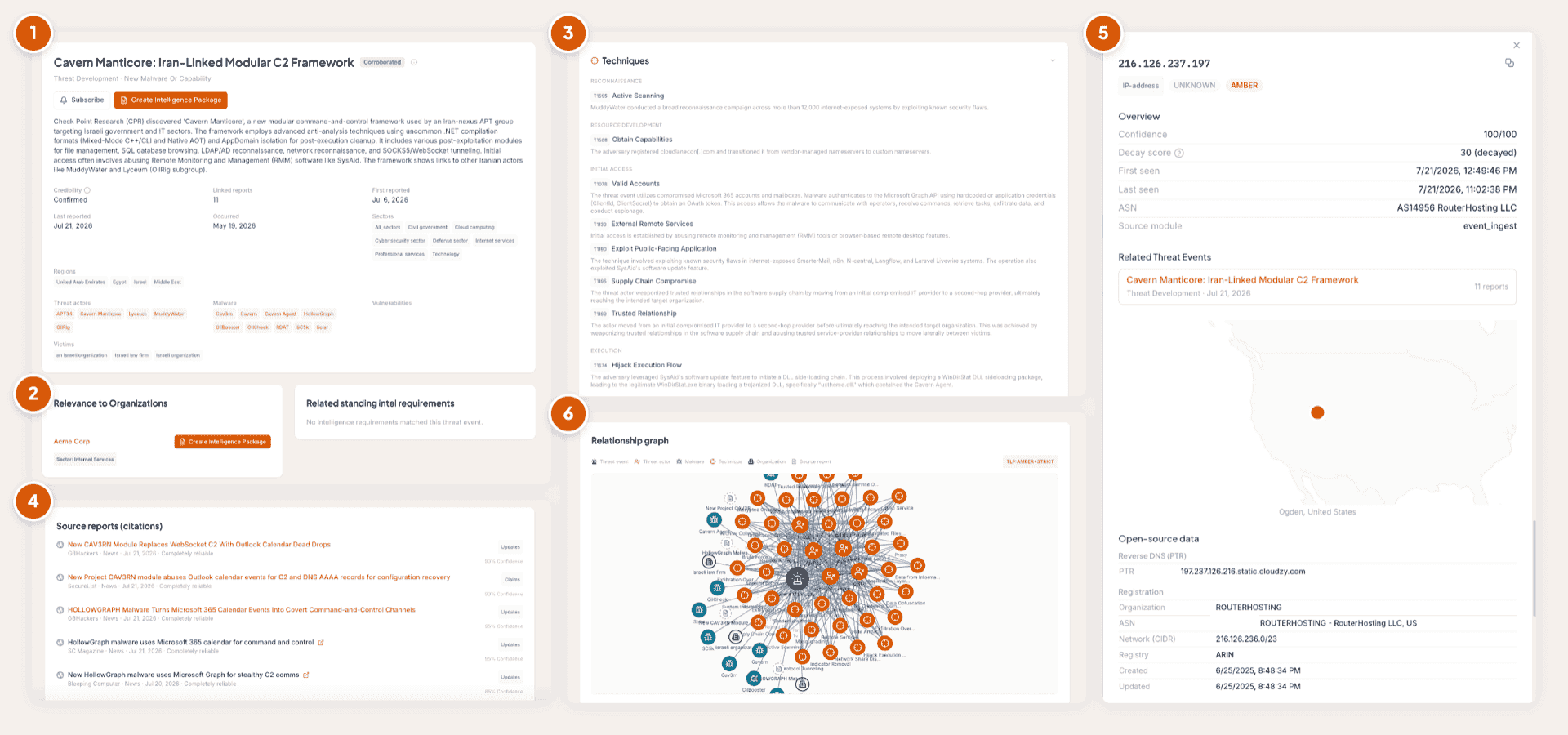
The source list and the relevance card are the two panels people come back to. The source list shows who is reporting the occurrence and whether they agree, and the relevance card shows which of the entities you protect it touches. Both are explained in full on the Threat Events page.
Turning on your first module
Step 6 is the one that most visibly changes what you see. The Analysis Modules sit in a grid under Modules, and each card shows whether it is active, inactive, or not yet set up.
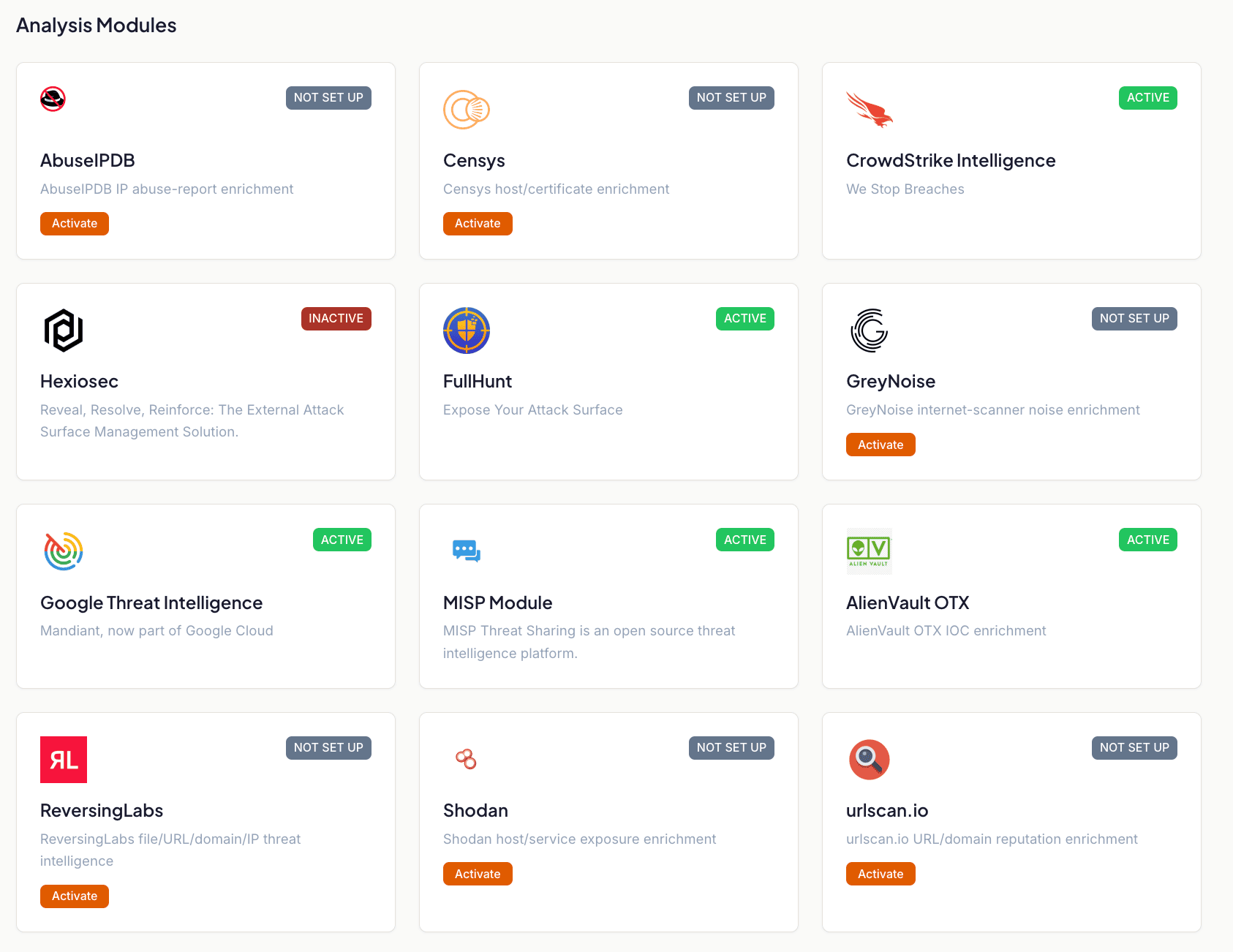
A free key at the provider usually comes with a monthly lookup quota, so check it if your usage is high. For what each provider adds and how the scores on an indicator are computed, see How Modules work and IOC enrichment and decay scoring.
Setting up for a team
The steps above are enough for one analyst on one Organization. If you are setting Liberty91 up for a team, or for several Organizations, work through these as well. Each links to its own guide.
- Choose where your data is hosted. Each Organization has a data region, and you can change it from the Customize page. See Data hosting and regions.
- Add users and assign roles. Invite your colleagues and give each one the right level of access. See Users and roles.
- Set your Intelligence Requirements. Pick the topics that matter to each Organization, or to your whole account, from the Intelligence Library, or create your own. See Set your Intelligence Requirements.
- Populate every Organization. If you protect more than one entity, give each its own Assets, Suppliers and documents, so its reporting is tailored to it rather than generic. See Set up your Organizations.
- Subscribe Stakeholders to Morning Reports. Once a Stakeholder exists, the daily report for their Organization can go straight to their inbox. See Customize your Morning Reports.
- Download the mobile app. Take the platform with you and produce intelligence on the move. See Download the mobile app.
Accounts activated by the Liberty91 team, such as Enterprise and MSSP accounts, have their Organizations created at activation. A self-serve account starts with one Organization already in place. Either way, nothing here needs to be created from scratch; the work is in filling it with the context that makes your reporting specific.
Where to go next
Once you have sent your first package, the core concepts explain how Events, Threat Events, Threat Entities and Intelligence Requirements fit together, and the guides cover the everyday work: searching, reporting, alerting and working with an Organization.
Frequently asked questions
What should I do first after logging in?
Open the most reported Threat Event on your dashboard. Every report on it is already collected, matched and enriched, so it is the quickest way to see what the platform does before you set anything up.
Do I have to set anything up before Liberty91 produces intelligence?
No. The dashboard, the Threat Events and the Threat Library are populated from open sources before your first login. Setup is what makes the output specific to you, and one uploaded document is enough to start.
Do I have to create my Organization?
No. A self-serve account starts with one Organization, and accounts activated by the Liberty91 team have theirs created at activation. Your job is to fill it with the context that makes reporting specific to you.