
Search events with advanced queries.
The Event Search page has two modes. The simple filter panel covers everyday lookups, and the Advanced query toggle at the top right of the search panel switches to a builder for questions the simple filters can't express, such as combining different sets of criteria in one search. Your simple filters work exactly as before; the toggle just moves between the two modes.
Groups and conditions
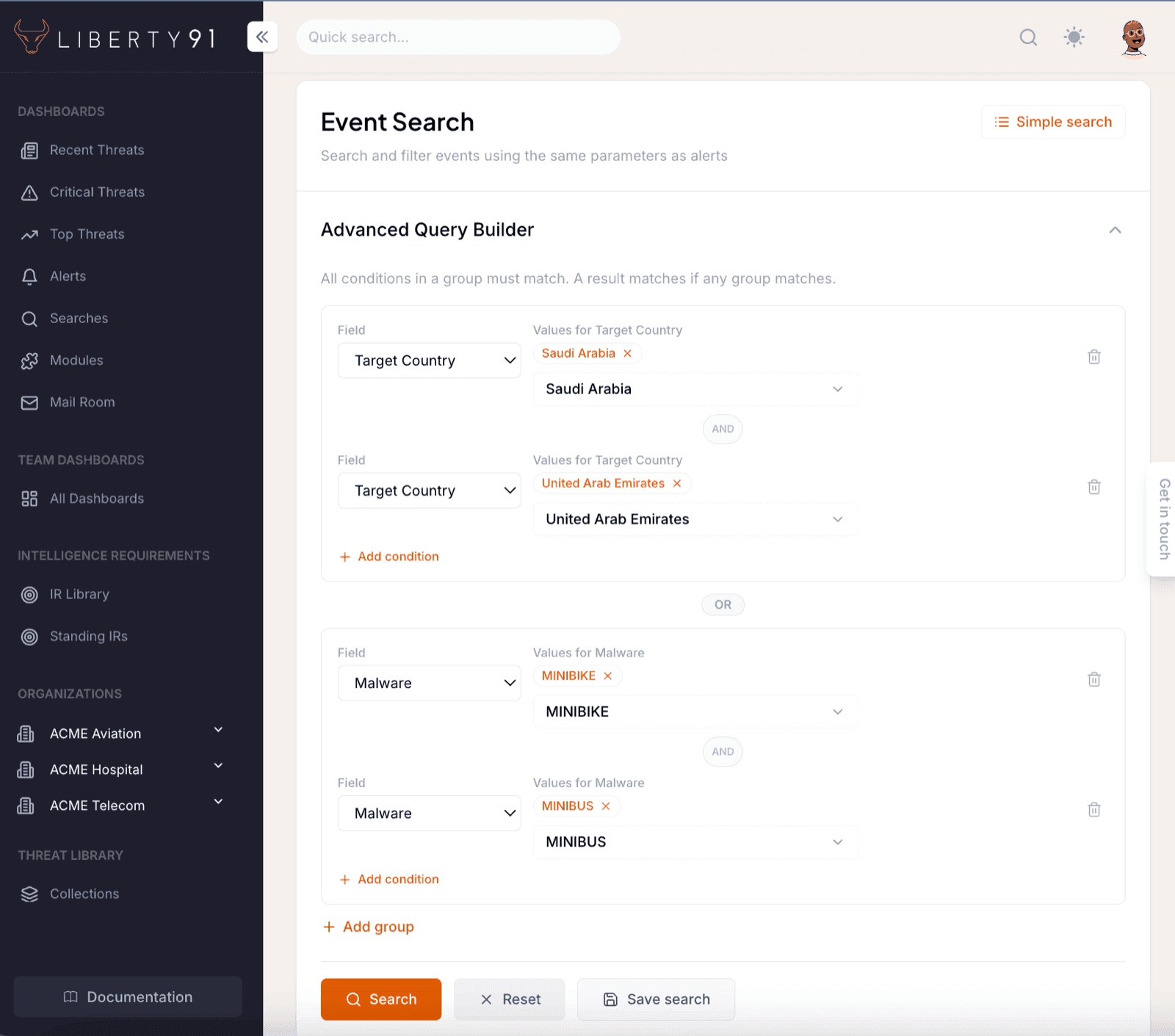
An advanced query is built from groups of conditions, and the logic is easy to keep straight:
- Every condition inside a group must match: conditions combine with AND.
- An event matches the query when any group matches: groups combine with OR.
- Several values inside one condition mean "any of these". A Target Country condition listing Saudi Arabia and the UAE matches events targeting either country.
Say you want events targeting Saudi Arabia or the UAE that involve MINIBIKE or MAXIBIKE. That is one group with two conditions: Target Country: Saudi Arabia, UAE and Malware: MINIBIKE, MAXIBIKE. An event has to satisfy both conditions to match, but any of the listed values will do within each one.
To broaden the search with completely different logic, add a second group. For example, a group with Sector: Finance and Free Text: ransomware returns finance-sector ransomware events as well, whether or not they match the first group. Each group is its own independent question, and the results are everything that answers at least one of them.
Condition fields
You can build conditions from these fields: Free Text, Target Country, Target Region, Source Country, Target State, Sector, Threat Actor, Malware, Vulnerability, Threat Cluster, Asset Technology, Supplier, Intelligence Requirement, Date From, and Date To.
A few details to know:
- Intelligence Requirements are a first-class field. You can search for every event linked to one of your Intelligence Requirements, which is a quick way to pull together the reporting behind a requirement.
- Dates are inclusive. A Date To of July 3 includes events from July 3 itself.
- Free text is capped at 3 conditions per query. The builder warns you when a query approaches the complexity limit and stops you before you go over it.
What search can reach
Search runs across the reporting you are entitled to. Sources you do not hold a licence or upload for are not searchable by you, and an occurrence covered only by reporting you are not entitled to does not appear at all. See Threat Events.
Preview results
Search results can include previews: public events that are not yet in your account's own feed. They are visually marked in the results list, so you always know which is which. Opening a preview, or acting on it, adds the event to your feed. This means a search is never limited to what your feed has already collected, and one search can pull in exactly the public reporting you were missing.
What you can do with a search
A search is a starting point, not just a results list. From here you can:
- Save the search so you and your team can re-run it any time.
- Generate a report from the results by selecting the events that matter.
- Turn on alerting for a saved search, so new matching events notify you automatically.
- Pin a saved search to a Team Dashboard as a live tile.